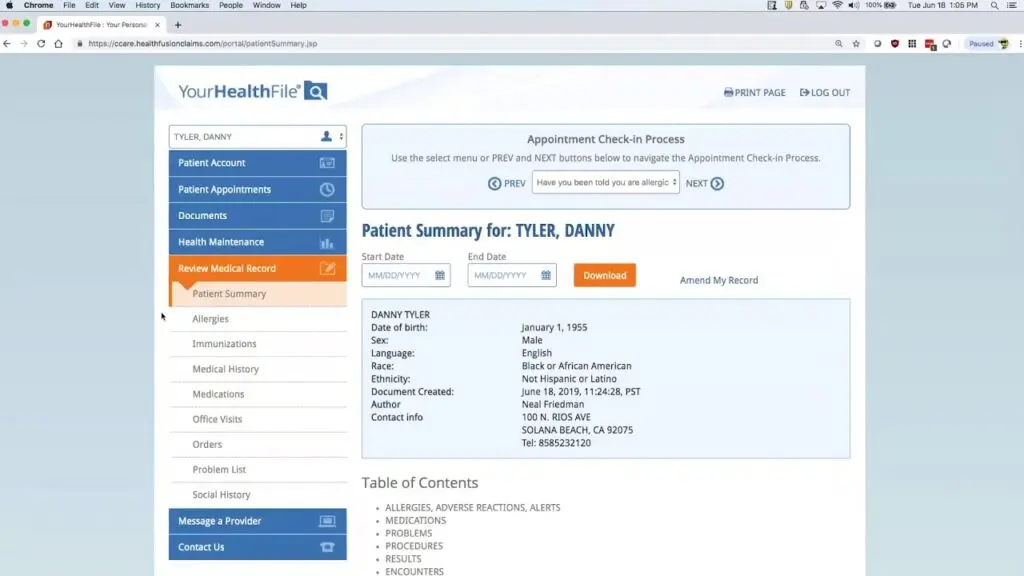
With YourHealthFile® you’ll be able to manage your health information in one convenient, secure place and:
Send and receive secure messages
Upload files and medical records to your Chart
Request appointments
Request prescription refills
See lab and radiology results, Prescriptions, health history, allergies, vaccine records, and visit summaries
Manage health information for family members/dependents (with Proxy access)
Pay your medical bills
What you need to do to prepare for a visit with your provider:
To request an appointment, call our office: 413-562-5173 and request an appointment. Once you have registered with and have access to the new Patient Portal, you will then be able to request any type of appointment from the patient portal!
Patient Portal Video Resources
Register on YourHealthFile After Receiving Provider Email
Learn how to self-register for YourHealthFile.com using the invitation email sent by your healthcare provider.
How to Request an Appointment
See how to request an appointment directly through the YourHealthFile patient portal connected to your provider.
Check In for Your Appointment on YourHealthFile
This video walks through checking in for your appointment online, including updating insurance, demographic details, and completing required clinical information before your visit.
How to Request a Medication Refill
Learn how to submit a medication refill request through the YourHealthFile patient portal.
View & Update Your Medical Record on YourHealthFile
Explore how to review and update your medical records, view lab results, access medication history, review upcoming procedures, and more.
Send a Secure Message
Learn how to securely message office staff for billing or scheduling questions and contact your provider directly for health-related concerns.
Make a Payment Through Your Patient Portal
See how to review balances, view payment details, and make secure online payments using a saved card or by adding new payment information.